If you want your website to rank on the first page of Google, you must master the fundamentals. The most critical starting point for any successful digital marketing campaign is On-Page SEO. Without optimizing the elements you control directly on your website, even the best backlink strategy will fail to produce sustainable results.
On-Page SEO (also known as on-site SEO) is the practice of optimizing individual web pages to rank higher and earn more relevant traffic in search engines.
Unlike off-page SEO, which refers to links and signals outside of your website, on-page SEO refers to both the content and the HTML source code of a page that can be optimized.
What is On-Page SEO and Why is it Critical?
Search engines like Google use complex algorithms to understand what your content is about. They “crawl” your website looking for specific signals to determine if your page matches a user’s search query.
On-page SEO provides these signals. It helps search engines interpret your page content so they can serve it to the right users.
However, it is not just about robots. It is also about the user experience. A properly optimized page loads faster, reads better, and makes it easy for visitors to find exactly what they are looking for.
When you align technical excellence with high-quality content, your organic traffic will grow naturally.
The Three Pillars of On-Page Optimization
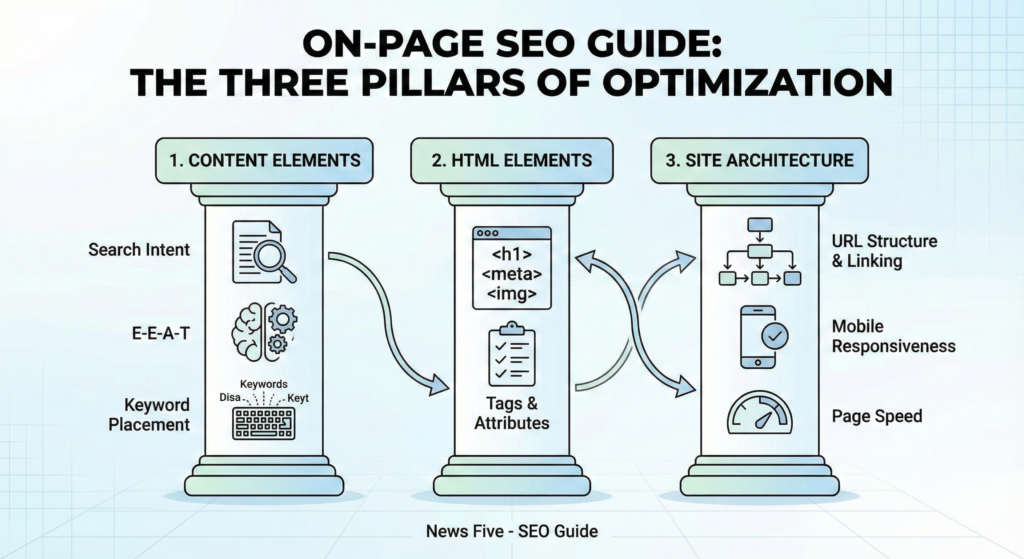
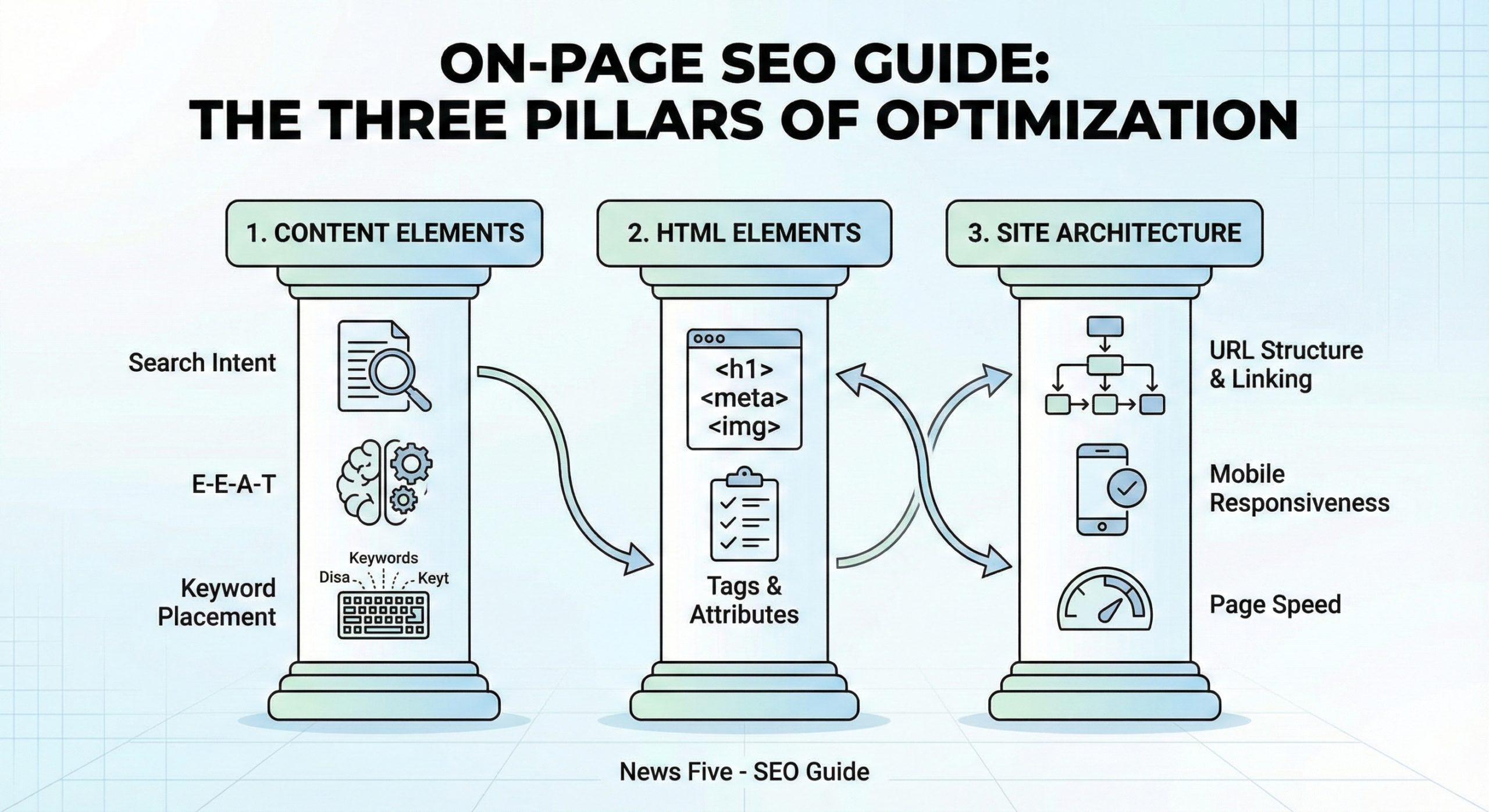
To simplify this vast topic, we can categorize on-page optimization into three distinct pillars:
- Content Elements: The quality and structure of the writing.
- HTML Elements: The code tags that describe your content.
- Site Architecture: How your pages are linked and organized.
Let’s dive deep into each specific factor that influences your rankings.
How to Optimize Your Content for Search Intent
In the modern SEO landscape, “content is king” is only half the truth. Context is king. You must align your content with Search Intent.
Understanding Search Intent
Before writing a single word, ask yourself: What is the user looking for?
- Informational: They want to learn (e.g., “How to bake a cake”).
- Transactional: They want to buy (e.g., “Buy running shoes online”).
- Navigational: They want a specific website (e.g., “Facebook login”).
If your target keyword is “best CRM software,” but you write a history of CRM systems, you will not rank. You must provide a comparison or listicle because that is what the user intends to find.
The Role of E-E-A-T
Google evaluates content based on E-E-A-T: Experience, Expertise, Authoritativeness, and Trustworthiness. Your content needs to demonstrate that you are a subject matter expert. Use accurate data, cite sources, and cover the topic comprehensively to satisfy the algorithm.
HTML Tags: The Technical Skeleton
As a front-end expert, I can tell you that clean code matters. Search engine crawlers look at specific HTML tags to understand the hierarchy and importance of your content.
1. Title Tags
The title tag is arguably the most important on-page SEO factor. It is the clickable headline that appears in the search results (SERP).
- Best Practice: Keep it under 60 characters so it doesn’t get cut off.
- Optimization: Place your primary keyword near the beginning of the title.
2. Meta Descriptions
While meta descriptions do not directly impact rankings, they heavily influence your Click-Through Rate (CTR). Think of this as your ad copy.
- Best Practice: Keep it between 150-160 characters.
- Optimization: Include a call to action and a summary of the page content.
3. Header Tags (H1, H2, H3)
Header tags structure your content.
- The H1 Tag: This is your main page title. You should strictly have only one H1 tag per page. It tells Google the main topic of the document.
- H2 and H3 Tags: These are subheadings. They break up text and make it scannable. Include LSI (Latent Semantic Indexing) keywords in these headers to help Google understand the context of your main topic.
How to Optimize Images for SEO?
Images make content engaging, but search engines cannot “see” images like humans do. They rely on text to understand them.
Alt Text
Alternative text (Alt Text) describes the image for screen readers and search engines.
- Bad:
<img src="image1.jpg" alt="image"> - Good:
<img src="red-running-shoes.jpg" alt="pair of red running shoes for marathon training">
File Size and Loading Speed
Large images slow down your site, hurting your Core Web Vitals. always compress your images using formats like WebP. A fast-loading page is a major ranking factor.
URL Structure and Internal Linking
Your site architecture helps Google crawl your website effectively.
URL Structure
Keep your URLs short, descriptive, and clean. Avoid ugly parameters like ?p=123.
- SEO Friendly URL:
yourdomain.com/on-page-seo-guide - Non-Friendly URL:
yourdomain.com/archives/12/05/topic/seo
Internal Linking Strategy
Internal links connect one page of your site to another. This does two things:
- It helps users navigate your site.
- It spreads “Link Juice” (authority) from high-ranking pages to new pages.
When linking, use descriptive Anchor Text. Instead of saying “click here,” link the words “download our SEO checklist.”
What is Keyword Density and Placement?
In the early days of SEO, people used “keyword stuffing”—repeating the same word 50 times. Today, this will get you penalized.
You should aim for a natural reading flow. However, strategic placement is still necessary:
- First 100 Words: Ensure your main keyword appears in the first paragraph.
- Frequency: Mention the keyword naturally throughout the text, but focus more on semantic variations (synonyms and related terms).
For example, if you are writing about “digital marketing,” also use terms like “online advertising,” “internet marketing strategies,” and “PPC campaigns.”
Mobile Responsiveness and User Experience (UX)
Google uses Mobile-First Indexing. This means Google looks at the mobile version of your site first to determine rankings.
If your text is too small to read on a phone, or if buttons are too close together, your rankings will suffer. Ensure your CSS creates a responsive design that adapts to all screen sizes.
Advanced On-Page SEO Techniques
Once you have the basics down, you can implement advanced tactics to outrank competitors.
Schema Markup
Schema markup is a piece of code (vocabulary) that you put on your website to help search engines return more informative results for users. It creates Rich Snippets, such as star ratings, recipe times, or event dates directly in the search results.
Featured Snippets Optimization
To rank for position zero (the box at the very top of Google), structure your answers clearly.
- Use bullet points for lists.
- Use tables for data comparison.
- Answer “What is…” questions directly in 40-60 words immediately after the heading.
Difference Between On-Page and Off-Page SEO
To ensure clarity, let’s briefly distinguish the two.
- On-Page SEO: Everything you do on your website. (Content, speed, keywords, internal links, HTML tags).
- Off-Page SEO: Everything that happens away from your website. (Backlinks from other sites, social media signals, brand mentions).
You need both, but you cannot have a successful off-page strategy without a solid on-page foundation.
Summary: Your On-Page SEO Checklist
To wrap up, here is a quick On-Page SEO checklist to ensure every page you publish is fully optimized:
- Primary Keyword is in the H1 tag and the first paragraph.
- URL is short, clean, and includes the keyword.
- Title Tag is compelling and under 60 characters.
- Meta Description is persuasive and under 160 characters.
- Content satisfies search intent and covers the topic deeply.
- Subheadings (H2, H3) include related semantic keywords.
- Images have descriptive filenames and Alt text.
- Internal Links point to other relevant resources on your site.
- Page Speed is optimized (images compressed, clean code).
- Mobile View is flawless.
On-page SEO is not a one-time task; it is an ongoing process. Search trends change, and algorithms update. However, by sticking to these core principles, you build a website that is valuable to users and easy for search engines to understand.